
Conversational Finance: AI Assistant that talks to your Fund Data
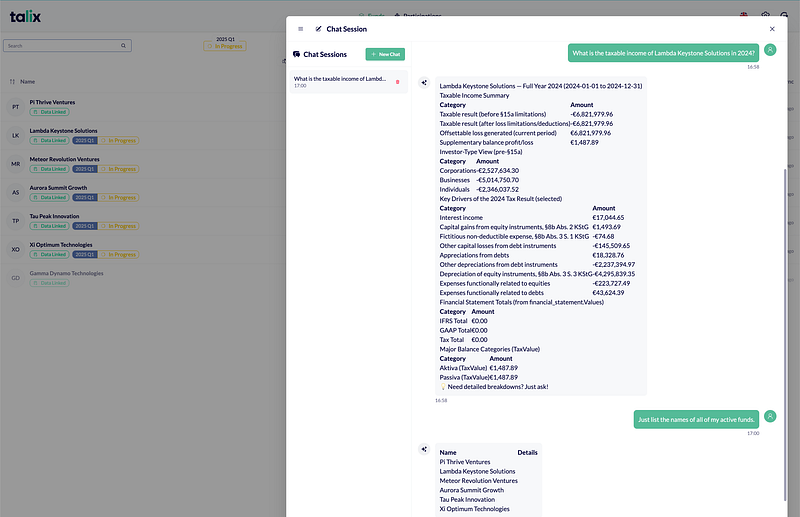
Talk to your fund.
What you see in the image is absolutely real, and for a real VC fund*.
We have been working with VC funds and taxation for sometime, and we thought it is high time we had a new way for fund managers and tax specialists to interact with financial data — naturally, securely, and instantly.
One of the key things is securely — and that’s where we have put MCP to good use. But, before going deeper into the hairy tech details, let me paint the whole picture.
The reality — everyone wants to know the numbers
Be it the quarter-end, or year end, the partners want to know the details of taxable income (among other things).
In Talix, you can login, navigate to the correct screen/s and then get the numbers for yourself. It is actually a breeze. We usually have someone lookup, and report. I don’t think we need to anymore.
Talix now includes a conversational AI assistant that lets general partners, and tax professionals interact with their financial data through natural language. You ask questions the way you’d ask a knowledgeable colleague, and the system responds with relevant information — while ensuring you only see data you’re authorized to access.
For an industry that has relied on spreadsheets, static reports, and complex navigation hierarchies for decades, this is big. I guess it is worth a few millions in funding (if I am going with the trend of AI bubble(?)).
Why This Matters (optional)
VC Fund admin/management/etc. is hard. Too many things to look up, and too many people to answer to. The challenge isn’t just the volume of data — it’s the friction involved in accessing, and presenting it.
Traditional software interfaces require navigation. And since you use it only when you’re in a hurry, they drive you mad.
Talix has a brilliant interface (this could be some kind of Ikea effect, as I did contribute to it), still it would be nicer to circumvent all that.
So, we opened it up with TalixGPT — carefully because of the significance of data security. A tax specialist managing multiple funds should see all of them. A general partner should only see funds they’re involved with. An AI assistant that ignores these boundaries would be worse than useless.
Quick Overview
In Talix, authorized users — currently tax specialists and general partners — see a chat button that opens a conversation window.
The assistant understands context. It can search for funds by name, retrieve detailed financial statements, and explain what data it found.
While respecting existing permissions at every step. When a general partner asks to see their funds, they see only their funds — the same data they’d access through the traditional interface, just delivered through a more natural interaction.
The assistant handles ambiguity gracefully. If it can’t find an exact match for a fund name, it offers suggestions. If you ask for something you don’t have access to, it explains that politely rather than failing silently.
From a user’s perspective, it is having an assistant who has all the spreadsheets at hand, is always available, and never puts you on hold (except for the time they need to lookup the numbers).
Security and Trust: How we protect the data
In everything with financial workflows, security is (and must be) the foundation. We designed the system with three distinct layers of protection, each serving a specific purpose.
Authentication First
Every chat request requires a valid login. The system verifies your identity before processing any question — the very same authentication that protects the rest of the application.
Role-Based Access
We made a deliberate choice to enable it only for tax specialists and general partners initially. This isn’t a technical limitation — it’s a business decision about who benefits most from access and who has the appropriate context to use it responsibly.
Permission-Aware Responses
Here’s where it gets important: when one asks about funds, the system queries the database using your permissions. A tax specialist sees the funds they manage. A general partner sees their own investments. The AI doesn’t have special access — it works within exactly the same boundaries as the traditional interface.
This means you can trust the assistant to show you what you’re allowed to see and nothing more. There’s no risk of accidentally exposing one client’s data to another, because the permission filtering happens at the database level, not in the AI layer.
How It Works (basically MCP server/client)
For those curious about the technology without diving into code, here’s the simplified flow:
When you type a question, it travels to our backend server, which acts as the coordinator. The backend sends your question to an AI language model (Bedrock/GPT-5/choice) along with information about what tools are available — things like “list funds,” “get balance sheet,” “search by name.”, etc.
The AI analyzes your question and decides which tools to use. If you ask about a specific fund’s P&L, it might first search for the fund by name, then retrieve the profit and loss statement.
The MCP sits between the AI and your database, accessible only to authenticated, authorized requests from the backend.
When the AI decides it needs fund data, the backend makes a request to this MCP server, passing along your user identity. The MCP server then collects the data with the permissions applied and returns the filtered results.
The AI takes those results and formulates a human-readable response, which travels back through the backend to your chat window.
This separation — AI reasoning in one place, data access in another — gives us clear boundaries. The AI never touches the database — not even for a millisecond. Every data request goes through our permission-aware tool layer. This architecture makes security auditable and maintainable.
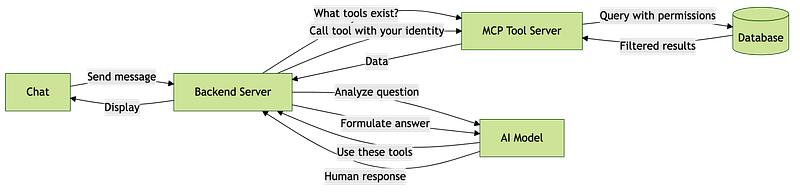
MCP isn't all that complex
Signing off,
Sandeep.
*it is anonymised data.
About the author

We have other interesting reads
Crossplane & Composition: Taming Secrets at Scale
In one of our client engagements, the development team found themselves in a bind. Running Kubernetes on AWS, they had to juggle **dozens of apps** — -each needing its own set of secrets, each demanding fresh databases on demand, and all under the watchful eyes of policy restrictions
Introducing Cronochat: Supercharge Your Slack with Recurring, Scheduled, Broadcast, and Anonymous…
Cronochat is a simple, powerful Slack app.
Resume Tailor — from side project to Product
Running a software agency has many advantages — it’s overall wonderful, but not without a few pain-points.