Cracking the CKAD in One Go: My Success Story and Tips
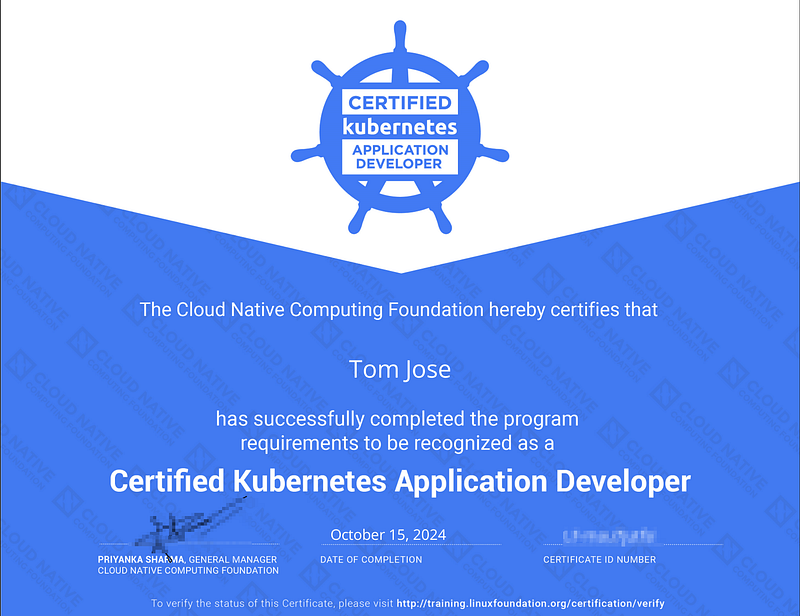 The Certified Kubernetes Application Developer (CKAD) certification, provided by the Cloud Native Computing Foundation (CNCF), is a globally recognized credential for professionals working with Kubernetes. Kubernetes, an open-source container orchestration platform, has become an essential tool in managing and scaling containerized applications. CKAD is a performance-based exam that validates your practical skills in designing, building, and deploying cloud-native applications using Kubernetes, with a focus on real-world problem-solving in a live environment.
Who is CKAD Certification for?
The CKAD certification is ideal for developers, DevOps engineers, and IT professionals who work with Kubernetes or aim to manage containerized applications. It focuses on the practical aspects of Kubernetes, making it valuable for anyone involved in building or maintaining applications in a Kubernetes environment.
Key Skills Required#### :
- Knowledge of Kubernetes core concepts like Pods, Deployments, Services, and Volumes.
- Hands-on experience with creating and managing Kubernetes objects.
- Familiarity with application configuration, including ConfigMaps and Secrets.
- Understanding of troubleshooting and debugging applications in Kubernetes.
- Basic understanding of networking, security, and monitoring in Kubernetes.
My Preparation Strategy
My approach to preparing for the CKAD exam was structured around building practical experience, despite having more than 2 years of experience in the Kubernetes domain and using almost every concept of Kubernetes in my day-to-day work. Here’s what worked for me:
Hands-on Practice: Since the CKAD exam is completely performance-based, I spent most of my time practicing real-world scenarios. I set up a Kubernetes cluster on my local machine using Minikube and experimented with different objects like Pods, Deployments, and Services. Even with my experience, I believe practice is crucial for getting comfortable with Kubernetes commands in a timed environment.
Time Management: The CKAD exam is timed, so I focused on solving problems under time constraints. I used mock exams and practice scenarios to simulate the exam environment. This helped me improve my speed in looking up commands, using kubectl effectively, and managing my time efficiently.
Focusing on Key Topics: The exam syllabus is vast, but certain topics are more heavily weighted. Even though I work with Kubernetes daily, I concentrated on areas like core concepts, multi-container Pods, observability, and services. This strategy helped me allocate my study time to the most critical areas, balancing practice with the exam’s demands
Study Materials I Used
- Kubernetes Documentation: The official Kubernetes documentation is incredibly detailed and useful for learning. During the exam, you are allowed to refer to this documentation, so I made sure to familiarize myself with its structure.
- Udemy Courses: I used an online course provided by KodeKloud on Udemy, taught by a Kubernetes expert. The course covered all the important exam topics and provided practice labs, which were incredibly useful in building hands-on skills. KodeKloud also offers an interactive environment where you can practice CKAD concepts and questions. This feature allowed me to apply my knowledge directly and interactively, which was key to reinforcing the material and preparing for the performance-based exam.udemy course: https://www.udemy.com/course/certified-kubernetes-application-developerkodekloud lab: https://learn.kodekloud.com/user/courses/udemy-labs-certified-kubernetes-application-developer
- Mock Exams: I took several mock exams to simulate the actual CKAD exam environment. On the KodeKloud platform, there are two mock exams, which helped me get started, but they weren’t as challenging as the real CKAD exam. When you purchase the CKAD exam, you also get two free sessions on Killer Shell, which provides much more challenging and complex questions. These sessions are an excellent way to practice under real exam conditions, and the questions are often more difficult than the actual CKAD exam. This helped me prepare for tougher scenarios and boosted my confidence for the real exam.
- GitHub Repositories: I followed a few popular GitHub repositories where other CKAD aspirants shared their study notes, commands, and practice exercises. These community resources were really helpful.https://github.com/dgkanatsios/CKAD-exerciseshttps://github.com/Tomjosetj31/kubernetes-CKADhttps://github.com/ibrahimatay/CKAD-Exerciseshttps://github.com/bmuschko/ckad-crash-course
My Exam Experience
On the day of the exam, I made sure to have a clean workspace and a reliable internet connection. The exam was proctored online, and I could only access the official Kubernetes documentation, which I had practiced navigating beforehand.
The exam consisted of real-world tasks that required me to work directly in a Kubernetes environment. Time management was critical because the questions were quite detailed. Some scenarios required advanced troubleshooting, but having a clear strategy helped me tackle them efficiently. Although I had practiced under timed conditions, the exam was harder than I expected — though not as difficult as the Killer Shell mock exams.
There were 16 questions in total, but I ran out of time and couldn’t attend to 3 of them. Despite this, I still managed to clear the exam. I received my results within 24 hours, and I was thrilled to get the email confirming that I had passed!
Suggestions for Those Preparing for the CKAD Certification
If you’re planning to take the CKAD certification, here are some suggestions based on my experience:
- Hands-On Practice is Key: The CKAD exam is performance-based, so you must get comfortable working directly with Kubernetes. Setting up your own Kubernetes environment using tools like Minikube or Kind is essential. Practice creating and managing objects like Pods, Deployments, and Services, and simulate real-world scenarios as much as possible. The more you practice, the better prepared you’ll be for the actual exam.
Tip: One resource that helped me a lot was the CKAD exercises GitHub repository. This repository contains a wide range of practice questions that simulate what you can expect in the real exam. It’s a great tool for building your hands-on skills and testing your knowledge across various Kubernetes concepts.
Familiarize Yourself with Kubernetes Documentation: You can access the official Kubernetes documentation during the exam, so it’s important to know how to navigate it quickly. Practice searching for commands and concepts so that you can efficiently find what you need on exam day.
**Master **
kubectl: You'll need to be fast and efficient withkubectlcommands. Learn how to use common flags, shortcuts, and create quick YAML manifests when necessary. Knowing how to use imperative commands will save you valuable time during the exam.
Tip: Always use aliases for kubectl commands to save time. For example, use k for kubectl, po for Pods, svc for Services, cm for ConfigMaps, etc. This can make typing much quicker and streamline your workflow.
Also, avoid creating full YAML manifests unless absolutely necessary. Use imperative commands whenever possible. For instance, if the question asks you to create a Pod, you can quickly do it with:
k run <pod-name> — image=<image-name>```

This approach will save you a significant amount of time, allowing you to focus on more complex tasks.

4. **Time Management**: Practice completing tasks within a limited time frame. Simulate exam conditions with mock exams and time yourself while solving problems. This will help you get used to working under pressure and learn how to prioritize tasks effectively.

**Tip**: Read each question carefully and completely. If you find yourself unsure about a question or think it will consume too much time, it’s better to skip it and move on to the next one. You can always come back to it later if you have time remaining. This strategy will help you maximize the number of questions you can complete successfully.

5. **Take Advantage of Killer Shell Sessions**: When you register for the CKAD exam, you get two free sessions on Killer Shell. These sessions are much tougher than the real exam, but they are excellent for pushing your limits and exposing you to complex scenarios. Each Killer Shell session is valid for 36 hours, so you can practice as much as you want during that period.

**Tip**: The questions in both Killer Shell sessions are the same, so use the first session to familiarize yourself with the tough scenarios and revisit the second session to improve your speed and accuracy. This will greatly enhance your final preparation for the exam.

6. **Focus on High-Weighted Topics**: Some areas of the syllabus carry more weight, such as core concepts, multi-container Pods, observability, and networking. Focus more on these topics during your preparation to maximize your chances of scoring well.

7. **Stay Calm and Manage Stress**: The CKAD exam can be intense, but staying calm is crucial. If you get stuck on a question, don’t panic move on to the next one and come back if time allows. It’s better to answer as many questions as possible than get bogged down by one difficult problem.

8. **Avoid Malpractices**: The CKAD exam is proctored online, and you’ll need to follow strict guidelines. Before the exam starts, you’ll be asked to show your room and desk setup to the proctor. Any suspicious setup or background noise can raise flags, and if the proctor notices something unusual, they will message you in the chat, which can disrupt your focus.

**Tip**: Sit straight in front of the camera, always look directly at the screen, and keep your hands visible on the desk throughout the exam. This ensures a smooth experience and avoids any unnecessary interruptions that could affect your concentration.

9. **Shell Session Management & Namespace Handling**: During the CKAD exam, you will be working in different shell sessions, each corresponding to different environments or tasks. Always double-check that you’ve connected to the correct shell by confirming your SSH session before proceeding with any commands.
One limitation during the exam is that you can’t change namespaces using `kubectl config set-context --current --namespace=<namespace>`. Instead, always practice creating objects directly in the required namespace by using the `-n <namespace>` flag. For example, when creating a Pod or any other resource, include the namespace flag like this:


```bash
kubectl run <pod-name> --image=<image-name> -n <namespace>```

This will ensure you’re working in the right namespace and avoid any potential issues during the exam.

10. **Use of External Monitor**: An external monitor can be very helpful during the CKAD exam. The terminal and documentation take up a small area on the screen, while around 30% of the screen is occupied by the exam questions, chat, instructions, and other icons. With an external monitor, you’ll have more screen space to comfortably view both the terminal and the documentation.

**Tip**: If you plan to use an external monitor, remember that only one screen is allowed during the exam, and you cannot use multiple screens. Additionally, if you’re taking the exam on an external monitor, you’ll need an external web camera to properly monitor your setup and comply with the proctoring rules. This setup will help reduce distractions and make it easier to manage your workspace during the exam.

#### My CKAD badge


[CKAD: Certified Kubernetes Application Developer was issued by The Linux Foundation to Tom Jose.Earners of this designation demonstrated the skills, knowledge and competencies to perform the responsibilities of a…www.credly.com](https://www.credly.com/badges/a7351b10-7f9c-4c3c-87a5-aba23a4715be)[](https://www.credly.com/badges/a7351b10-7f9c-4c3c-87a5-aba23a4715be)#### Conclusion

Clearing the CKAD certification in my first attempt was a challenging but rewarding experience. The exam’s focus on real-world, performance-based tasks requires hands-on practice, time management, and a solid understanding of core Kubernetes concepts. By leveraging tools like KodeKloud’s course, practicing with Killer Shell sessions, and maintaining focus during the exam, I was able to prepare effectively and approach the test with confidence.

For those planning to take the CKAD, my advice is to practice as much as possible, manage your time wisely, and stay calm during the exam. With the right preparation and strategy, you can successfully pass the CKAD and validate your Kubernetes application development skills. Good luck!
About the author

We have other interesting reads
From Proof-of-Concept to Production: Evolving Your Self-Healing Infrastructure
In the previous article, we explored building a self-healing nginx infrastructure using KAgent and KHook, covering autonomous configuration validation, intelligent analysis, and automated remediation.
The Art of Debugging: Beyond Breakpoints and Print Statements
Debugging. For many software developers, the word itself conjures images of late nights, endless scrolling through logs, and the gnawing frustration of an elusive bug. We often view it as a necessary evil, a mundane chore that pulls us away from the “real” work of writing new features.
Ten Commandments for working from home
Start early — at the time you usually leave to work. Don’t squander the travel time.