
Building Self-Healing Nginx Infrastructure: A Technical Guide to Deploying KAgent and KHook
- Revolutionizing Kubernetes Configuration Management with KHook and KAgent: A Comprehensive Solution for Automated Nginx Troubleshooting and Remediation
- Building Self-Healing Nginx Infrastructure: A Technical Guide to Deploying KAgent and KHook
- From Proof-of-Concept to Production: Evolving Your Self-Healing Infrastructure
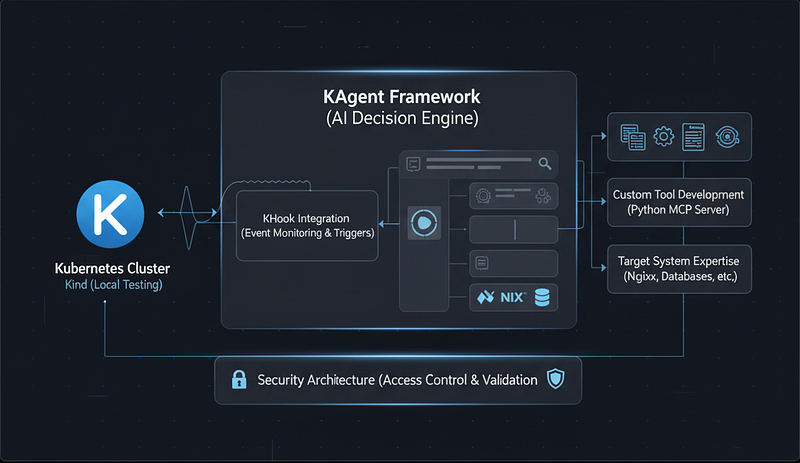
From Demonstration to Implementation
In our previous article, we saw how KAgent and KHook can automatically detect and fix nginx configuration issues in real-time, transforming what would typically be hours of manual troubleshooting into a fully automated resolution. The demonstration showed the power of agentic AI for infrastructure management — but how do you actually build and run this system?
This guide provides a complete, step-by-step implementation of the nginx self-healing infrastructure, covering:
- Step 1: Namespace setup for component organization
- Step 2: Nginx test deployment (with intentional errors)
- Step 3: MCP Server implementation with 10 specialized tools
- Step 4: Remote MCP server access configuration
- Step 5: KAgent creation for intelligent analysis
- Step 6: Testing KAgent with invoke command
- Step 7: KHook setup for event monitoring
- Step 8: Testing the self-healing system
- Step 9: Monitoring and observability setup
- Production: Considerations for production deployment
Let’s transform that compelling demonstration into a working system you can deploy in your own environment.
Prerequisites and Environment Setup
Before we begin implementation, ensure you have the following prerequisites in place:
Infrastructure Requirements
Kubernetes Cluster:
- Kubernetes v1.20 or higher
- kubectl CLI tool configured and authenticated
- For local development: Kind, Minikube, or k3s (optional)
Development Environment:
- Python 3.8 or higher
- Docker and container registry access
- Git for version control (optional)
- Text editor or IDE (optional)
KAgent Framework:
- KAgent installed and configured in your cluster
- Access to KAgent CLI and dashboard
- Understanding of KAgent agent and hook concepts Required Documentation:
- KAgent Documentation
- KHook Documentation (optional)
Network Access:
- Container registry for pushing/pulling images
- Cluster networking configured for pod-to-pod communication
- HTTP access for MCP server communication
Verify Your Environment
# Check Kubernetes cluster access
kubectl cluster-info
kubectl get nodes```
Verify KAgent installation
kubectl get agents --all-namespaces
kubectl get hooks --all-namespaces
Check Python version
python --version # Should be 3.8+
Verify Docker access
docker version```
System Architecture: Component Overview
Before diving into implementation, let’s understand the complete architecture:

Step 1: Setting Up the Namespace
First, we’ll create a dedicated namespace for all our components.
# Create the kagent namespace for all components
kubectl create namespace kagent```

**What this achieves:**

- ✅ Isolated namespace for KAgent components (kagent)
- ✅ Clean organization for our infrastructure

### Step 2: Deploying Test Nginx Infrastructure

Before building the self-healing components, let’s deploy the nginx infrastructure we want to protect.

Create a new nginx deployment manifest with some intentional configuration errors. This will help demonstrate the self-healing capabilities:

1. Create a file called `nginx-test-deployment.yaml` with a basic nginx deployment
1. Add a ConfigMap with an invalid nginx configuration (e.g. missing semicolons, incorrect directives)
1. Configure the deployment to use this ConfigMap
1. Deploy it to your cluster — it should fail to start due to the configuration errors

This gives us a real-world scenario to validate our self-healing infrastructure later.

Deploy the test infrastructure:


```graphql
# Deploy the nginx test environment
kubectl apply -f nginx-test-deployment.yaml
# Watch the pod status - it will crash due to the syntax error
kubectl get pods -n default -l app=nginx-test -w
# You should see the pod in CrashLoopBackOff due to the missing semicolon
# Press Ctrl+C to stop watching```

**What this achieves:**

- ✅ Test nginx deployment with intentional configuration error
- ✅ ConfigMap-based configuration for easy updates
- ✅ Service for potential traffic routing
- ✅ Real-world scenario for validating self-healing

### Step 3: Implementing the File Reader MCP Server

The MCP server is the core engine that provides specialized tools for nginx configuration management. This Python-based HTTP server exposes 10 specialized tools that KAgent will use to analyze and fix nginx configurations.

**1. Configuration Analysis Tools (4 tools):**

- `read_file`: Read nginx configuration files from allowed directories
- `validate_nginx_config`: Check syntax errors (missing semicolons, unclosed braces)
- `analyze_nginx_config`: Comprehensive analysis (security, performance, best practices)
- `list_nginx_configs`: Enumerate available configuration files

**2. Configuration Management Tools (1 tool):**

- `write_file`: Write configuration files with content validation

**3. Kubernetes Integration Tools (4 tools):**

- `update_configmap`: Update nginx ConfigMap with new configuration
- `restart_deployment`: Restart nginx deployment to apply changes
- `get_deployment_from_pod`: Map pod names to deployment names
- `get_pods_by_label`: List pods by label selector

### Security Features

The MCP server implements multiple security layers, with initial security measures implemented at the tool level. However, for production environments, additional security hardening is required beyond these basic protections. Our current security includes:


```ini
# Security configurations
ALLOWED_DIRECTORIES = ['/tmp/shared_data', '/etc/nginx-configs', ...]
FORBIDDEN_PATTERNS = ['../', '/etc/passwd', 'rm -rf', ...]
MAX_FILE_SIZE = 10 * 1024 * 1024  # 10MB limit```
Path validation
def validate_path(file_path):
Check forbidden patterns
Check allowed directories
Return True/False```
Example Tool Implementation
Here’s a simplified view of how a tool works:
def read_file(file_path: str) -> Dict[str, Any]:
    """
    Reads the content of a file from a given path.
    Supports multiple locations for nginx configurations.
    """
    # Handle absolute paths
    if file_path.startswith("/"):
        return _read_absolute_path(file_path)

    # Handle relative paths - search in base directories
    return _search_relative_path(file_path)```

### Dockerize and Deploy

**1. Create Dockerfile.**

**2. Build and push.**


```bash
docker build -t your-registry/file-reader-mcpserver:latest .
docker push your-registry/file-reader-mcpserver:latest```

**3. Deploy to Kubernetes** (`mcpserver.yaml`): Create a Kubernetes manifest file `mcpserver.yaml` to deploy the MCP server. The manifest should:

1. **Create a Deployment that:**

- Uses your built MCP server image
- Mounts the nginx config files
- Exposes port 3000
- Runs in the kagent namespace

1. **Create a Service to expose the MCP server:**

- On port 3000
- With appropriate selector labels
- In the kagent namespace

**4. Apply and verify:**


```csharp
kubectl apply -f mcpserver.yaml
kubectl get pods -n kagent -l app=file-reader-mcpserver```

**What this achieves:**

- ✅ MCP server with 10 specialized tools deployed
- ✅ HTTP endpoint for tool invocation (port 3000)
- ✅ Security validation and access controls
- ✅ Kubernetes API integration with kubectl
- ✅ Health checks and resource limits
- ✅ ConfigMap and deployment management capabilities

### Step 4: Configuring Remote MCP Server Access

Configure KAgent to access the MCP server remotely for distributed tool execution. The `remotemcpserver.yaml` manifest defines how KAgent connects to our MCP server. This is a critical configuration that:

1. Creates a RemoteMCPServer resource that KAgent uses to discover and connect to the MCP server
1. Specifies the internal Kubernetes service URL where the MCP server is accessible
1. Ensures proper namespace alignment between KAgent and the MCP server
1. Enables secure communication between components within the cluster

This configuration bridges the gap between KAgent’s tool requirements and the MCP server’s implementation, allowing seamless remote execution of our specialized nginx management tools. Apply the configuration:


```bash
kubectl apply -f remotemcpserver.yaml```

### Step 5: Creating the Nginx Configuration Agent

Now we’ll create the intelligent KAgent that will analyze and remediate nginx issues. The agent combines an AI model (GPT-4) with access to all 10 MCP tools to perform automated troubleshooting.

### Agent Configuration Overview

The `nginx-agent.yaml` file configures:

**1. AI Model:** OpenAI GPT-4 with low temperature (0.2) for consistent, reliable fixes

**2. System Prompt:** Provides the agent with nginx expertise including:

- Configuration syntax and best practices
- Common misconfigurations and their fixes
- Security hardening techniques
- Kubernetes ConfigMap and deployment management

**3. Available Tools (10 total):**

- Configuration analysis: `read_file`, `validate_nginx_config`, `analyze_nginx_config`, `list_nginx_configs`
- Configuration management: `write_file`
- Kubernetes operations: `update_configmap`, `restart_deployment`, `get_deployment_from_pod`, `get_pods_by_label`

**4. Remediation Workflow:**


```sql
Find pod → Read config → Validate → Analyze → Create fix →
Update ConfigMap → Restart deployment → Verify success```

### Deployment


```csharp
kubectl apply -f nginx-agent.yaml
kubectl get agent -n kagent nginx-config-agent```

**What this achieves:**

- ✅ Specialized AI agent for nginx troubleshooting
- ✅ Comprehensive system prompts with domain expertise
- ✅ Integration with all 10 MCP tools
- ✅ Structured workflow for problem resolution
- ✅ Best practices and security guidelines embedded

### Step 6: Testing the KAgent

Before setting up automated event monitoring, let’s verify that the KAgent is working correctly by manually invoking it.

#### Test Agent with Invoke Command

Use the KAgent CLI to manually invoke the agent and test its capabilities:


```lua
# Invoke the agent with a test prompt
kagent invoke nginx-config-agent \
  --namespace kagent \
  --prompt "Please analyze the nginx-test pod in the default namespace and check if there are any configuration issues."```
Watch the agent execute the workflow
The agent will:
1. Find the nginx-test pod using get_pods_by_label
2. Read the nginx configuration
3. Validate and analyze the configuration
4. Report any issues found```
The agent should respond with a detailed analysis:
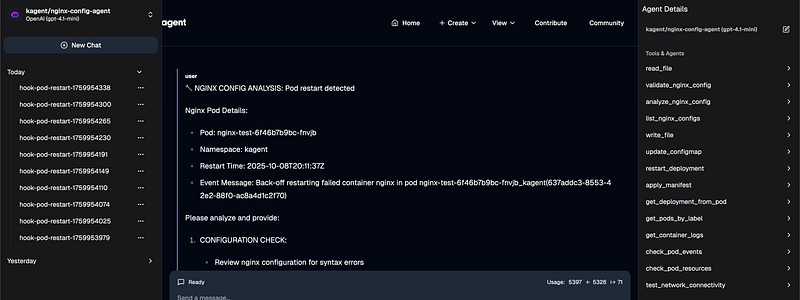 You can also test the agent’s ability to actually fix issues:
# Invoke with remediation instructions
kagent invoke nginx-config-agent \
  --namespace kagent \
  --prompt "The nginx-test pod is crashing. Please analyze the configuration, identify the issue, fix it, and restart the deployment."
# The agent will execute the full remediation workflow:
# 1. Analyze configuration
# 2. Create corrected configuration
# 3. Update ConfigMap
# 4. Restart deployment
# 5. Verify pod is running```

#### Access KAgent Dashboard

You can also interact with the agent through the KAgent dashboard for a visual interface:


```bash
# Port-forward to access the KAgent dashboard
kagent dashboard
# Open in browser
# http://localhost:8080```

**In the KAgent Dashboard:**

1. Navigate to **Agents** section
1. Select **nginx-config-agent**
1. Click **“Invoke Agent”** button
1. Enter your prompt in the text area
1. Click **“Execute”** to run
1. View real-time execution logs and tool invocations
1. See the agent’s response and any actions taken

**What this achieves:**

- ✅ Verifies agent is properly configured and functional
- ✅ Tests integration with MCP tools
- ✅ Validates agent can analyze nginx configurations
- ✅ Confirms agent can execute remediation actions
- ✅ Provides hands-on experience before automation
- ✅ Access to visual dashboard for easier interaction

**Note:** Testing the agent manually before setting up KHook ensures the system works correctly and helps you understand the agent’s capabilities and workflow.

### Step 7: Setting Up KHook for Event Monitoring

Create the KHook that monitors nginx pod events and automatically triggers the agent when issues are detected.

#### Hook Configuration Overview

The `nginx-config-monitoring.yaml` file configures:

**1. Event Triggers (4 types monitored):**

- `pod-restart`: Detects when pods restart due to crashes
- `pod-pending`: Catches pods stuck in pending state (>2 minutes)
- `probe-failed`: Monitors liveness/readiness probe failures
- `oom-kill`: Detects out-of-memory kills

**2. Target:** Monitors pods in `kagent` namespace with label `app=nginx-test`

**3. Agent Integration:** Invokes `nginx-config-agent` when events occur

**4. Prompt Template:** Sends structured information to the agent including:

- Event details (type, pod name, status, restart count)
- Container status (state, exit code, reason)
- Required actions (6-step remediation workflow)

**5. Hook Behavior:**

- **Debounce:** 30 seconds between triggers (prevents multiple rapid fixes)
- **Concurrency:** 1 execution at a time (sequential processing)
- **Timeout:** 300 seconds (5 minutes max per execution)
- **Retry:** Up to 2 attempts with 60-second backoff

#### Deployment


```bash
kubectl apply -f nginx-config-monitoring.yaml
kubectl get hook -n kagent nginx-config-monitoring```

**What this achieves:**

- ✅ Real-time monitoring of nginx pod events
- ✅ Multiple event types covered (restart, pending, failed, probe failures, OOM)
- ✅ Automatic agent triggering on event detection
- ✅ Detailed prompt template with structured workflow
- ✅ Debouncing and retry logic for reliability

### Step 8: Testing the Self-Healing System

Now that all components are deployed, let’s verify the self-healing system works as expected.

The nginx pod we deployed in Step 2 should be in CrashLoopBackOff due to the missing semicolon. Let’s observe the automated remediation.

#### Monitor the Automated Remediation


```bash
# Terminal 1: Watch pod status
kubectl get pods -n default -l app=nginx-test -w
# Terminal 2: Watch KAgent logs
kubectl logs -n kagent -l app=nginx-config-agent -f
# Terminal 3: Watch KHook logs
kubectl logs -n kagent -l app=khook-controller -f
# Terminal 4: Watch MCP server logs
kubectl logs -n kagent -l app=file-reader-mcpserver -f```

#### Verify the Fixed Configuration


```bash
# Check the updated ConfigMap
kubectl get configmap nginx-config -n default -o yaml
# View the corrected nginx configuration
kubectl get configmap nginx-config -n default -o jsonpath='{.data.nginx\.conf}'
# Verify the pod is running
kubectl get pods -n default -l app=nginx-test```

The above monitoring commands will show the current status and health of all components in the self-healing system, including agents, hooks, servers and recent executions.

### Step 9: Monitoring and Observability

To ensure your self-healing infrastructure operates reliably, implement monitoring that provides visibility into system health and performance. Focus on tracking:

- Overall system health and availability
- Success rates of automated fixes
- Resource utilization and performance
- Critical failures requiring attention

Consider integrating with your existing enterprise monitoring stack to aggregate metrics, visualize data, and route alerts appropriately.

By maintaining good observability, you’ll be able to validate that your self-healing system is working effectively and quickly identify any issues that need investigation.

### What About Production?

**Important Note:** The system you’ve just built is a functional proof-of-concept perfect for development and testing environments. However, production deployment requires significant additional considerations around

- **Security**
- **Reliability**
- **Compliance**
- **Enterprise integration**

**These considerations aren’t optional — they’re essential for production deployment, and we cover them comprehensively in the next article.**

### Conclusion

You’ve now successfully implemented a complete nginx self-healing infrastructure using KAgent and KHook. This system demonstrates the power of agentic AI for autonomous infrastructure management:

### What We’ve Built

- **Complete Self-Healing System:** Automatic detection and remediation of nginx configuration issues
- **10 Specialized Tools:** Comprehensive MCP server with validation, analysis, and Kubernetes integration
- **Intelligent Agent:** AI-powered nginx troubleshooting with domain expertise
- **Event-Driven Automation:** Real-time monitoring and response through KHook
- **Production-Ready Architecture:** Security controls, RBAC, and scalability considerations

### Key Takeaways

1. **Agentic AI transforms infrastructure management** from reactive to proactive
1. **KAgent and KHook provide the framework** for intelligent automation
1. **Specialized tools and domain expertise** are critical for effective remediation
1. **Security and access controls** must be carefully designed and implemented
1. **Comprehensive testing and monitoring** ensure reliable autonomous operation

The integration of KAgent’s intelligent orchestration with our specialized file and nginx analysis tools creates a powerful solution that transforms infrastructure management, but we recognize the valid concerns around AI automation. We suggest implementing several critical safeguards that organizations should carefully consider:

- **Human Oversight**: Organizations should maintain human operator approval rights for critical changes through configurable approval workflows, even while automation handles routine tasks
- **Bounded Automation**: The system should have clear, well-defined limits on what it can modify, with strict validation of all automated actions
- **Gradual Adoption**: Teams should follow a careful phased deployment approach, expanding automation scope slowly as confidence and experience grows
- **Comprehensive Logging**: Detailed audit trails should be implemented for all automated actions to enable review and rollback capabilities
- **Fail-Safe Defaults**: Conservative default settings should be configured to prioritize safety over automation
- **Kill Switches**: Emergency stop capabilities should be implemented and tested to allow immediate halting of automated operations

As organizations navigate the transition to more automated infrastructure management, maintaining the right balance between automation and control is critical. Our solution provides a framework for thoughtful automation adoption that respects the need for security, reliability and human oversight while still delivering meaningful operational benefits.

The future of infrastructure automation isn’t about removing humans from the loop — it’s about empowering teams with intelligent tools that augment their capabilities while maintaining appropriate safeguards and controls. This balanced approach allows organizations to realize the benefits of automation while managing risk appropriately.

### The Journey Continues: From Proof-of-Concept to Production

**You’ve built something remarkable.** A self-healing nginx agent that autonomously detects, analyzes, and remediates configuration issues. It works beautifully in your development environment. But the real question isn’t whether it works — it’s whether you can trust it with your production infrastructure.

**The evolution from prototype to production-grade platform requires answering critical questions:**

- How do you secure autonomous agents for enterprise deployment?
- Can you extend this pattern across databases, applications, and storage?
- What about predictive intelligence that prevents failures before they occur?
- How do you integrate with your existing monitoring and incident management systems?

**Part 3 unveils how to evolve** your nginx self-healing prototype into a production-ready enterprise platform. Learn to harden, scale, and extend self-healing across your infrastructure while maintaining robust security controls.

Organizations using these patterns see dramatic improvements: up to 95% faster incident recovery, 50% fewer incidents through prevention, and operations teams focused on strategy rather than firefighting.

**Ready to evolve your self-healing infrastructure?**

**→ Continue to Part 3:**[From Proof-of-Concept to Production: Evolving Your Self-Healing Infrastructure](https://medium.com/@maryam_11175/from-proof-of-concept-to-production-evolving-your-self-healing-infrastructure-06bd46f86c54)

*Discover the systematic approach to production readiness, infrastructure-wide coverage, predictive intelligence, and enterprise integration.*

*For questions, support, or contributions, contact *[Kotaicode GmbH (haftungsbeschränkt)](http://core@kotaico.de)*. This implementation is designed to be educational and to help guide organisations in exploring the possibilities of AI-driven infrastructure management.*
About the author

We have other interesting reads
Crossplane & Composition: Taming Secrets at Scale
In one of our client engagements, the development team found themselves in a bind. Running Kubernetes on AWS, they had to juggle **dozens of apps** — -each needing its own set of secrets, each demanding fresh databases on demand, and all under the watchful eyes of policy restrictions
SSH to WSL from terminal emulator
So, you have setup WSL ( Windows Subsystem for Linux) and are not happy with the “built in”emulator. In my case, I wanted to use an…
Revolutionizing Kubernetes Configuration Management with KHook and KAgent: A Comprehensive Solution for Automated Nginx Troubleshooting and Remediation
Picture this: It’s 3 AM, and your phone is buzzing with alerts. Your nginx web server is crashing every few minutes, stuck in an endless restart loop. Your website is down, customers are frustrated, and you’re manually troubleshooting configuration issues that should be simple to fix